Website Development Best Practices 2026: An Owner's Checklist
Published October 22, 2026
Have an idea worth shipping?
Book a free 30-minute call — no sales pitch, just a clear plan and a fixed-price quote for your product.
Book a free 30-minute call — no sales pitch, just a clear plan and a fixed-price quote for your product.
You can't judge code, and you shouldn't have to. Good website development shows itself in things anyone can check. How fast does the site load on a bad phone connection? Can Google find it? Will every visitor be able to use it? Is it yours once the final invoice is paid? Bad development hides its problems until they cost money, usually twice: once for the build, and again for the rescue.
Here's the checklist we walk clients through, written for people who commission websites rather than code them.
Website development best practices in 2026, in one list:
If a developer treats any of these as optional extras, treat that as your answer.
Three shifts separate a 2026 build from a 2019 one. Google finished its switch to mobile-only indexing in 2024, so it now judges your site by its phone version. AI assistants (Google's AI Overviews, ChatGPT, Perplexity) answer questions by citing a handful of pages. They favor sites that load fast and structure their content cleanly. Accessibility has also moved from courtesy to law in more places. The European Accessibility Act has applied to a wide range of businesses serving EU customers since 28 June 2025, and US companies face thousands of web accessibility lawsuits every year.
A site that ignores all three is quietly becoming invisible, and in some markets, legally exposed.
"Mobile-friendly" means a desktop design was squeezed onto a phone. Mobile-first means the phone experience was designed first and the desktop version grew from it. The difference shows up in thumbs and eyeballs: buttons you can tap without missing, text you can read without zooming, forms that don't fight you.
Most visits now arrive on a phone. Ask to see the mobile designs first. Any developer will comply; the good ones already work that way.
Google measures loading experience with three numbers called Core Web Vitals:
| Metric | What it measures | Target |
|---|---|---|
| Largest Contentful Paint (LCP) | Time until the main content appears | 2.5 seconds or less |
| Interaction to Next Paint (INP) | Delay between a tap and the page responding | 200 milliseconds or less |
| Cumulative Layout Shift (CLS) | How much the page jumps around while loading | 0.1 or less |
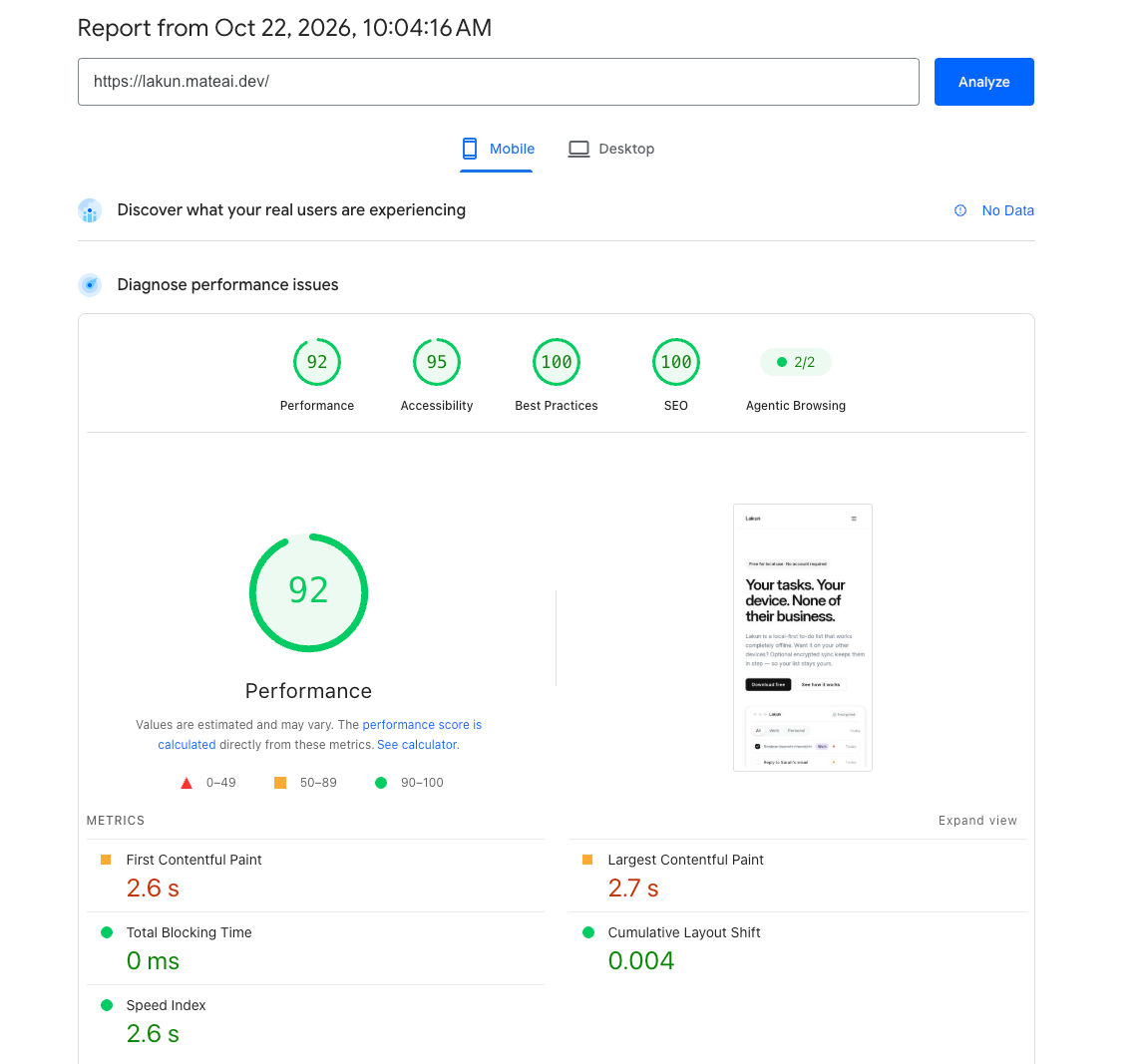
You don't need to memorize them. "Fast" is an opinion; milliseconds are a spec. Before launch, ask for a PageSpeed Insights report run on your actual site with your actual content. The designer's demo is always fast; it doesn't have your four-megabyte hero photos yet.
Accessibility means the site works for visitors using screen readers, keyboards, or captions, and for anyone reading a phone in direct sunlight. In practice: alt text on images, color contrast that holds up, forms that announce their own errors. The standard to name in a contract is WCAG 2.2 Level AA: the benchmark EU law points to and the de facto bar in US accessibility lawsuits.
You reach more customers, and you stay off the wrong side of the European Accessibility Act (in force since 28 June 2025). US federal courts saw 3,117 website accessibility lawsuits filed in 2025, 27% more than the year before, and that count excludes state courts entirely (Accessibility.build's lawsuit tracker).
Building accessibility in from day one adds little to the budget. Retrofitting it adds a lot. Ask directly: "Will you build to WCAG 2.2 AA and give me an accessibility statement?" For a first pass you can run yourself, Recite Me's free ADA compliance check scans your homepage. It emails back a report of issues with recommended fixes.
No, and on its own, not even close. HTTPS has been table stakes for a decade: Google has used it as a ranking signal since 2014, and browsers stamp "Not secure" on pages that lack it. In 2026 the real risks are quieter. Out-of-date software. Backups that have never been test-restored, and turn out to be broken the one time they're needed. Forms that email customer data into an inbox nobody watches.
Most hacked websites aren't cleverly attacked; they're neglected: a plugin that stopped receiving updates, a password unchanged since the Obama administration. Ask what gets updated and how often, who monitors the site, and what happens if it breaks on a Friday night. The answers tell you whether you're buying a partner or a handoff.
Here's the classic disaster: a beautiful redesign launches, every old address returns "page not found," and years of search rankings evaporate overnight. The fix is unglamorous and effective. A redirect map from old URLs to new ones. Then a sitemap search engines can read, page titles and descriptions you can edit yourself, and structured data (labels that tell machines your prices, reviews, and opening hours).
The AI layer is new in 2026 and built on the same foundations. Assistants like ChatGPT and Google's AI Overviews cite a short list of sources per answer. They parse the signals search engines already reward: fast pages, real text instead of text baked into images, clear headings. A site that machines can read is a site machines can recommend.
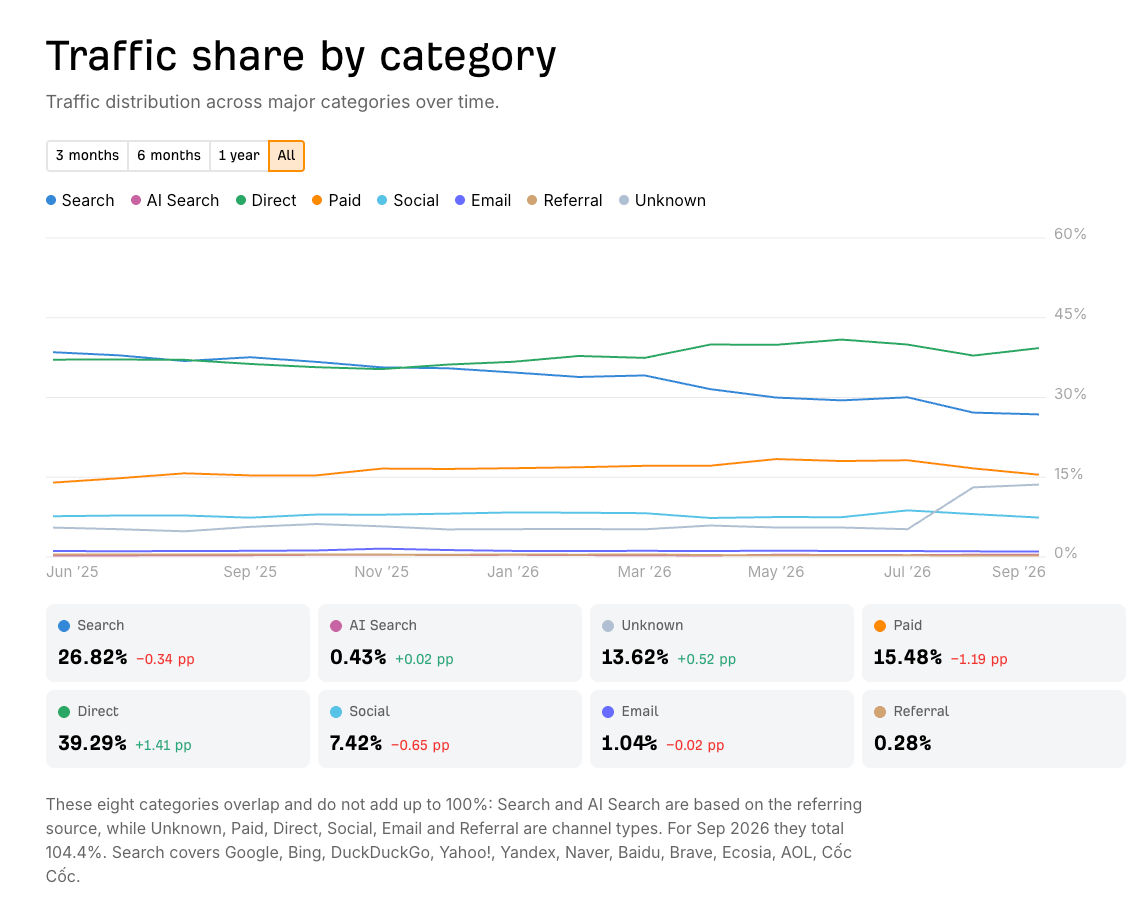
Some numbers for scale, so you can budget expectations honestly. Across the 115,254 sites tracked in Ahrefs' AI-vs-search benchmark, search engines sent 337.7 million visits in September 2026. Every AI assistant combined sent 5.3 million, roughly 1.6% of what search sends. ChatGPT accounts for 4.3 million of those (0.34% of traffic, up 0.02 points), followed by Meta AI at 577K, Gemini at 266K, Claude at 79K, and Perplexity at 64K. But in the latest month ChatGPT grew 14% while Google slipped 3%, and the direction is hard to miss. That's why AI readiness isn't a separate line item on this checklist: the same build quality earns both audiences.
The most expensive lesson in this article. A surprising number of businesses learn this during a falling-out or an agency collapse. The developer registered the domain under their own name, hosted the site on their own account, and never handed over the code. What they paid for was rented all along.
Before signing, get four things in writing:
Reputable developers offer this unprompted. We've untangled enough hostage situations to be blunt about it.
Every serious site needs a content management system (CMS), but the question that matters is narrower: what can you change yourself? If editing a headline, adding a service page, or swapping a photo requires an email and an invoice, your website has a paywall around its own text.
Ask for a demo of the editing interface before you commit, and a recorded training session once the site is live. Twenty minutes of video saves twenty emails.
Insist on clicking through the site yourself, on a staging link, on your own phone. Then a short list:
Finish by running the final URL through PageSpeed Insights (free, no account needed): the report includes accessibility checks alongside the speed scores. This is the one meeting where your skepticism pays for itself. Nobody knows your business like you do, and launch-day typos live forever in screenshots.
A website is a plant. Software needs updating, SSL certificates expire, links rot, content goes stale. None of this is a defect. It's what happens to anything that runs on the internet.
Good developers sell maintenance openly: monthly updates, uptime monitoring, tested backups, and a quarterly look at what's working. Ask what it costs and what it includes before you sign the build contract, because you'll be paying it for as long as the site exists. Ours start at $500 a month; here's what that covers.
Print these. A developer who bristles at the list has answered a different question for you.
How much does a well-built business website cost in 2026?
Mostly it depends on complexity. Our builds start at $100 for a simple website and scale with scope; current pricing is here. One honest note on cheap quotes: what separates a fair low price from a dangerous one is what got cut to reach it. AI-accelerated delivery cuts cost. Skipping the checks in this article cuts corners.
How long should a website project take?
A simple site can ship in as little as two weeks; larger builds run for months. The number matters less than what fits inside it: two weeks to rebuild an online store is a warning.
Is WordPress still a good choice in 2026?
Yes. A well-built WordPress site beats a badly built custom one, and a well-built custom one beats a badly built WordPress site. Speed, security, and accessibility come from the developer's discipline, and that discipline travels with the developer, whatever platform you choose.
How often should a website be rebuilt?
Refresh content continuously. Revisit the build when the business changes direction or the underlying platform ages out of support. A well-maintained site can serve for a decade; a neglected one is old at three.
Run your current website through PageSpeed Insights at pagespeed.web.dev: one URL, two minutes, no account. Then request Recite Me's free ADA compliance check for the accessibility side. Whatever the reports say, you'll leave knowing your first question. And if you'd like a second pair of eyes on a proposal, a quote, or an existing build, that's a conversation we're always glad to have. You'll find us at mateai.dev.