Multiplatform vs Native 2026, What Changes?
Published October 14, 2026
Have an idea worth shipping?
Book a free 30-minute call — no sales pitch, just a clear plan and a fixed-price quote for your product.
Book a free 30-minute call — no sales pitch, just a clear plan and a fixed-price quote for your product.
Multiplatform vs. native dominated mobile conversations this year, mainly because major companies built on React Native are moving back to native. Shopify made the loudest exit, and Coinbase's lead engineers have signaled they may follow. The debate itself is old: native and multiplatform have always been compared from every angle, because each has real strengths. What is different in 2026 is AI-assisted coding. Coding with a large language model (LLM) has become the norm, and supervised LLMs are now dependable tools for writing production code. That changes the math on how much a shared codebase saves you. This article walks through the 2026 landscape, compares the two approaches, and explains when to choose each one.
You can build mobile apps in two broad ways today. Native development uses the languages and frameworks that Apple and Google themselves support: Swift with SwiftUI for iOS, and Kotlin with Jetpack Compose for Android. Multiplatform frameworks build for both iOS and Android (and often desktop and web) from one shared codebase, which cuts the work enormously. The most popular options are Flutter, React Native, Kotlin Multiplatform, Tauri, and .NET MAUI.
In one line each:
Native will always win this round. Every multiplatform framework carries extra weight. Instead of talking to the operating system directly, your code goes through a translation layer. Flutter ships its own rendering engine and Dart runtime, React Native bundles a JavaScript engine, and KMP compiles your shared code to native binaries. That machinery inflates app size and holds performance close to, but never quite at, native level. In practice, users cannot tell the difference, except on animation-heavy screens and low-end devices, where the gap shows.
Winner: Native, by a smaller margin than most people think. One exception is worth noting: Tauri uses the operating system's built-in webview instead of bundling an engine, so its apps stay small.
This one depends entirely on the plan. If you are a solo developer targeting a single platform, iOS only or Android only, native makes more sense: you get the best performance and the smallest app size, and the shared-codebase advantage never applies to you. Shipping on both iOS and Android is the other case: one shared codebase cuts the work dramatically. You build the app once instead of twice, and both versions ship at the same time.
Winner: Native for a single platform; Multiplatform for both, which is most apps.
It depends on the framework. Native developers are the easiest to hire, because Swift and Kotlin are established, well documented, and constantly taught. React Native and Flutter talent is everywhere, so the big multiplatform frameworks sit close behind. The smaller frameworks are the problem, since Tauri or .NET MAUI specialists are much scarcer. One thing to weigh: native means hiring two specialists, one in Swift and one in Kotlin, while a single multiplatform developer covers both platforms.
Winner: it depends on the framework and on how many platforms you need covered.
Native wins this one. When SDK vendors build integrations for payments, analytics, auth, or ads, they target the biggest audiences first, and that is always iOS and Android native. The popular multiplatform frameworks come next: Flutter and React Native now get official support from major services like Firebase and RevenueCat. Smaller frameworks like Tauri often wait longer, or rely on community-built wrappers that lag behind the official SDKs.
Winner: Native, though the gap has narrowed for Flutter and React Native.
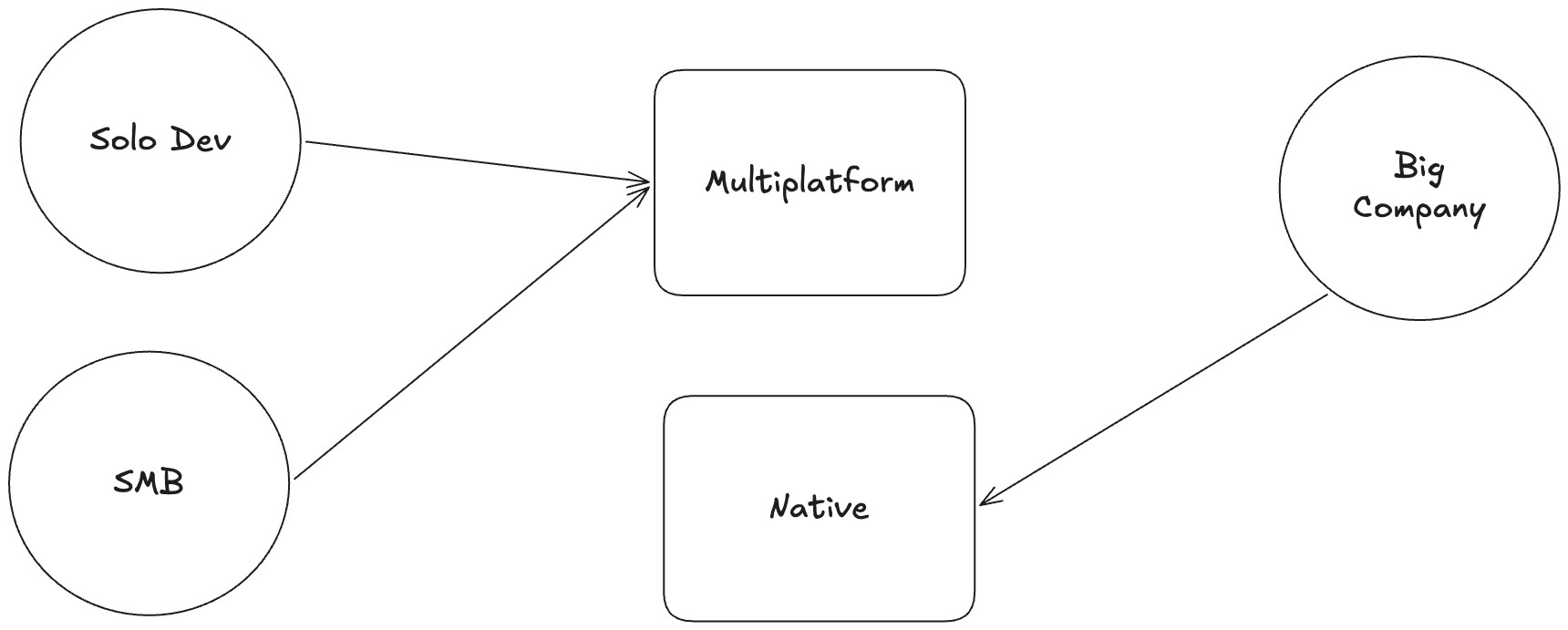
Solo developer or small team: choose multiplatform. One person cannot maintain two codebases for a single app. With one shared codebase, you iterate faster, and every bug fix ships to both platforms at once.
Small or mid-sized company: multiplatform is still the right call. The reasoning is the same under different constraints: your tech team is small, and so is your budget. One lean team shipping both platforms beats funding two separate teams you cannot afford.
Large company with the budget for two dedicated teams: go native. When you can run one iOS team and one Android team in parallel, native pays off: the best possible user experience, deeper platform integration, and specialists on each side. This is exactly the math Shopify redid. The framework decision changes once team size stops being the constraint.
Is React Native dead in 2026? No. The New Architecture closed most of the performance gap, and it still powers apps at massive scale. What is true is that React Native is no longer the automatic default it was in 2020; Shopify's exit ended the era of everyone betting on it. React Native is alive, but the decision now deserves real scrutiny.
Why did Shopify move back to native? Shopify bet on React Native in 2020, when the framework let a small team ship both platforms at once. As the company grew large enough to fund dedicated iOS and Android teams, the math flipped and native's higher ceiling on user experience became worth the cost. Team size changed the decision; the framework never failed.
Is Flutter faster than native? No, but the gap is smaller than most people think. Flutter renders every pixel itself, so you get a perfectly consistent UI everywhere at the cost of some overhead. Users cannot tell the difference on typical apps. The gap appears on animation-heavy screens and low-end devices.
Do multiplatform apps feel native? It depends on the framework. React Native uses real native UI components, so it feels native by default. Flutter draws its own UI, which stays consistent and polished but never platform-standard. KMP keeps your UI fully native because it shares only the logic underneath.
Which is cheaper, native or multiplatform? Multiplatform, usually by a wide margin: one codebase costs less to build and maintain than two. The exceptions are apps that target a single platform, where there is nothing to share, and large companies that can afford two teams and want the highest possible user experience.
Should I learn Flutter or Swift/Kotlin in 2026? Flutter or React Native suits you if you want to ship products fast and keep your options open. Swift suits you if you are aiming for platform teams at big companies or deep iOS craft. KMP is nearly free to add if you already know Kotlin. The framework you will actually finish projects in beats the optimal one every time.
Can AI write an entire app now? Not unattended. With human supervision, LLMs now draft large chunks of production code dependably. That cuts both ways: AI makes generating two native codebases cheaper, which erodes multiplatform's core advantage, and it makes a shared codebase faster to iterate on. The tools keep improving while the value of code-sharing shrinks.
Is Kotlin Multiplatform production-ready? Yes. KMP has been stable since late 2023 and runs in production at companies like Netflix and McDonald's. The catch: KMP shares your business logic while your UI stays native, so you still need iOS and Android expertise in house.
Can Tauri really build mobile apps? Yes. Tauri 2 added iOS and Android support. Your UI runs in the operating system's built-in webview over a Rust core, and app sizes stay small. The tradeoff: Tauri is the youngest mobile option here, and third-party SDK support is mostly community-built.
Who should use .NET MAUI? Teams already living in C# and the Microsoft ecosystem. It rarely wins on momentum or community, but reusing your existing code and developers beats any framework advantage.